
NOW ACCEPTING PILOT CUSTOMERS Explore live demo · Plan my dashboard
Menu

BUSINESS DASHBOARDS · CAYMAN ISLANDS

Less spreadsheet.
More perspective.

Turn the Excel and CSV files you already use into one clear business dashboard.

Track sales, expenses, inventory and key performance measures without rebuilding reports every month.

Starting at CI$35/month + setup.
YOUR BUSINESS / OVERVIEW↗

Business pulse

A month in focus.

SAMPLE DATA
RevenueCI$28,400↑ 12.7% vs August
Operating resultCI$9,100Revenue less expenses
Revenue & expenses APR–SEP
AprMayJunJulAugSep
Sales.csvExpenses.csvStock.csvONE CONNECTED VIEW

Business dashboards for Cayman companies

SAME DATA. A CLEARER VIEW.

From scattered files
to one clear view

Your business already creates the data. The problem is usually finding it, combining it and turning it into something useful.

BEFORE

Files in different places.

Another month. Another manual summary.

Sales.xlsxSales records
Expenses.xlsxCost records
Inventory.csvStock records
POS reportsDaily exports
Email attachmentsMore files to find
Manual calculationsRepeated each month
Separate monthly reportsDifferent versions
AFTER
Trends

One management view, built around your business.

Sales performanceExpensesInventory levelsBusiness trendsKey performance measuresDownloadable PDF reportsHistorical performance

Built from your agreed Excel and CSV exports.

Keep using the systems and files you already have. Trends brings the information together into one clear view.

TRY A BUSINESS VIEW

See the numbers.
Work the dashboard.

Choose a business and month. Review the figures, calculated observations and matching PDF reports.

Sales, operating expenses, and food stock. Fictional business, illustrative data.

Sales overviewILLUSTRATIVE DATA · CI$

Select a bar for the exact amount.

CategoryAmountShare

What would this show for your business?

We agree your measures, source files and reporting scope before setup.

Plan my dashboard ↗

REPORTING FOR YOUR BUSINESS

Start with your industry

Restaurant and Retail examples include detailed sample records and calculated observations. All figures are fictional.

These examples illustrate reporting options, not a complete accounting system. Property Management and Logistics demos are planned.

A LOCAL, MANAGED SERVICE

Your files. Your measures.
Help with the technical side.

For small and growing Cayman businesses. Keep your existing systems and website, with pricing in Cayman Islands dollars.

Built around your questions

Agree the measures, data sources and reporting views before we build.

Managed for you

Dashboard setup, database management, hosting and maintenance, within an agreed service scope.

How does this compare with spreadsheets or a BI project?

Spreadsheets let you build your own reports. A custom BI project is scoped around your chosen tools and provider. Trends offers a managed setup using agreed Excel and CSV files, from CI$150 setup plus CI$35/month.

Features, support and costs vary by approach. Our plan limits and additional-work rates are shown below.

FROM FILES TO ANSWERS

A straightforward setup.

Keep your existing website. Access your dashboard through a link, or a dedicated address such as yourbusiness.dashboard.ky.

01 / DEFINE

Choose what matters.

Agree the questions, measures, and dashboard views your business needs.

02 / CONNECT

Bring the records together.

Review sample files, match fields and identifiers, and organise the data in a managed database.

03 / REVIEW

Make reporting routine.

Upload your agreed Excel or CSV files, review trends, and share the results with your colleagues.

SMALL BUSINESS PRICING

Simple plans for different
stages of business

Choose the level that best matches how much of your operation you want to see in one place. All prices are in Cayman Islands dollars.

ENTRY

Micro

Best for an owner who wants the basics

Choose two reporting pages, such as sales and expenses.

CI$35/month
CI$150 one-time setup
  • Up to 2 dashboards
  • Up to 10 key measures
  • Up to 2 data sources
  • Mobile access
  • PDF reporting
  • Standard support · 15 minutes/month
Start with Micro ↗
ADVANCED

Growing Business

Best for management reporting across multiple areas

For management reporting across multiple business areas.

CI$120/month
CI$600 one-time setup
  • Up to 8 dashboards
  • Up to 50 key measures
  • Up to 8 data sources
  • Mobile access
  • Management PDF reports
  • Priority support · 60 minutes/month
Start with Growing Business ↗
What your setup fee covers

Setup includes dashboard design, data structure review, initial data import, branding, access configuration and testing.

Monthly fees include hosting, database management, maintenance and the support allowance shown. Each plan includes one scheduled refresh per month using your agreed files.

One dashboard means one reporting page with related charts, tables and measures. Each Sales, Expenses or Inventory tab in the demo represents one dashboard. A measure is a distinct figure, such as revenue or gross margin.

One source means one agreed dataset, such as a sales export. Reusing it across reporting pages does not consume another source allowance. A dashboard can combine included sources.

Refreshes, changes and additional charges

Included: one scheduled refresh each month after you provide files in the agreed layout, routine maintenance and your plan’s support minutes. Initial setup includes one design revision and a handover.

Extra refreshes, changed file layouts, new measures, extensive cleanup and new integrations are scoped before work starts. Additional work is CI$75/hour, billed in whole-hour increments, minimum CI$75. Support minutes cover questions and troubleshooting, rather than new development.

Reproducible build defects are corrected without extra charge for 30 days after launch. Later maintenance issues and changes are reviewed against the agreed service scope before any charge.

An additional structured source starts at CI$50 setup, subject to review. Automated integrations, extra storage or processing receive separate quotes.

Setup, payment, backups and cancellation

Setup covers dashboard design, data structure review, initial import, branding, access configuration and testing. Payment is 50% deposit and 50% after acceptance, before launch. Monthly fees are paid in advance.

User access, storage, backup frequency, recovery arrangements, retention and cancellation terms are agreed in your written quote before launch. Ask us to include your data export and deletion requirements. Website development is excluded.

WHAT THE MONTHLY FEE COVERS

Keep your reporting current

One scheduled refresh per month, plus hosting, maintenance and the support allowance in your plan.

01

Send your agreed files

Use the approved layout and reporting period.

02

Review the refreshed figures

Compare performance with retained reporting periods.

03

Share the report

Download a management PDF. Historical retention is agreed at setup.

MANAGEMENT PDF REPORTS

Dashboard when you want it.
Report when you need it.

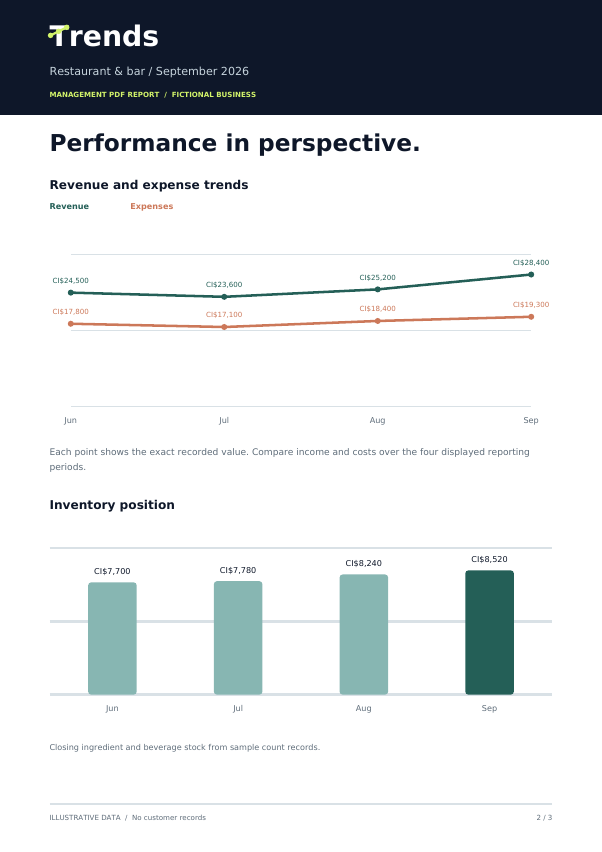
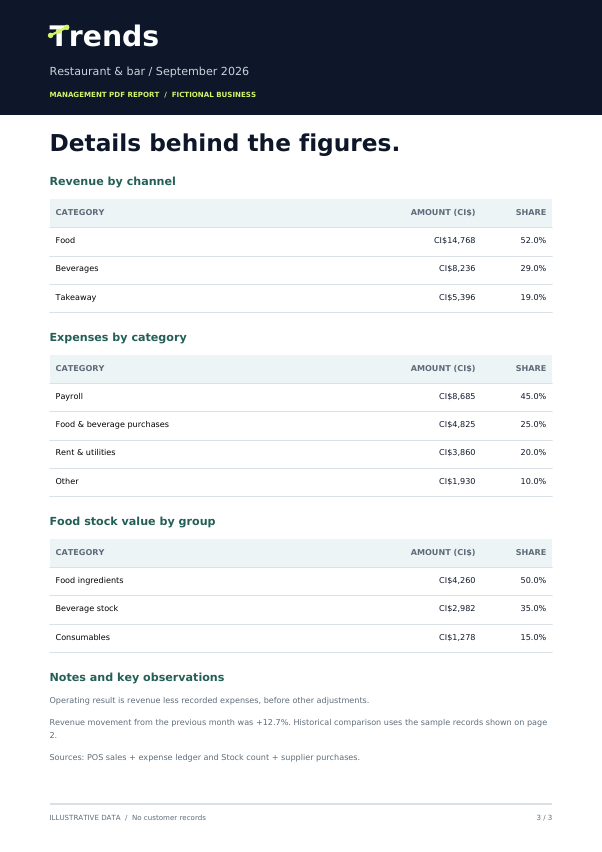
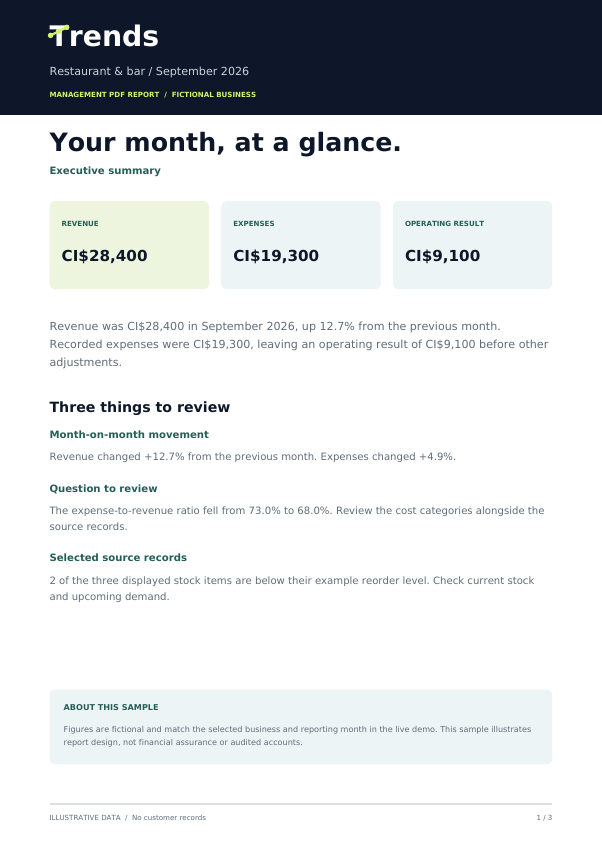
Open an actual three-page sample with an executive summary, charts and supporting tables.

Explore a sample report ↗

September 2026 · Illustrative data

Download management PDF report ↓

These are previews of the actual downloadable PDF. Change the business and reporting month in the live demo to explore another report. All figures are fictional. Customer branding, report scope and historical retention are agreed during setup.

DESKTOP · TABLET · MOBILE

Your business,
wherever you are

Access your dashboard from desktop, tablet or mobile and check the information that matters without opening multiple files.

Desktop

Review the full dashboard, trends and detailed reports.

Tablet

Useful for meetings, site visits and management reviews.

Mobile

Check key figures, sales, inventory and performance away from your desk.

Illustrative dashboard layouts using fictional sample data. These previews reflect the business and period selected in the live demo.

Explore live demo ↗

BEFORE YOU SHARE INFORMATION

Your data and access

Your business retains ownership of its data. Use fictional or anonymised information for a demo.

Private review

Enquiries and sample downloads are restricted to the owner account. Demo submissions are not published.

Values-only samples

Accepted files are checked and converted to CSV. New original uploads are not retained.

Agreed service controls

Customer access, backups, recovery and retention are defined in your service quote before launch.

Retention, deletion and data use

Trends reviews submissions to respond to enquiries and prepare requested demos. Form details are stored in the site database. Sanitised sample CSVs are stored separately from public website files, with owner-authorised downloads.

There is currently no automatic deletion schedule for enquiry records or sample CSVs. They remain until removed by the owner. To request deletion, use the contact form with your reference and the email used to submit. We verify the request before removal.

Paid-service retention, cancellation, export and deletion arrangements are agreed in writing before launch. No fixed backup schedule or recovery time is promised on this page.

LET’S START WITH YOUR BUSINESS

Plan my dashboard

Tell us a little about your business and what you want to see more clearly.

Trends reviews your request, replies by email to clarify the scope, then provides a setup quote. No payment is taken through this form.

What would you like to track?

By submitting, you agree to these details being saved so we can review your request and respond by email. Data use and deletion.

Other services and contact enquiries

OTHER SERVICES

Contact Trends

Ask about other services or request deletion of a submission. Include your reference if you have one.

Ready to plan your dashboard?

Plan my dashboard ↗